A team of AI agents.
Working in parallel.
MeshSwarm is the autonomous agent engine inside MeshSpace. You write the mission. The swarm plans it, maps your codebase, builds in parallel, and reviews its own work — all while you watch from a live Kanban board.
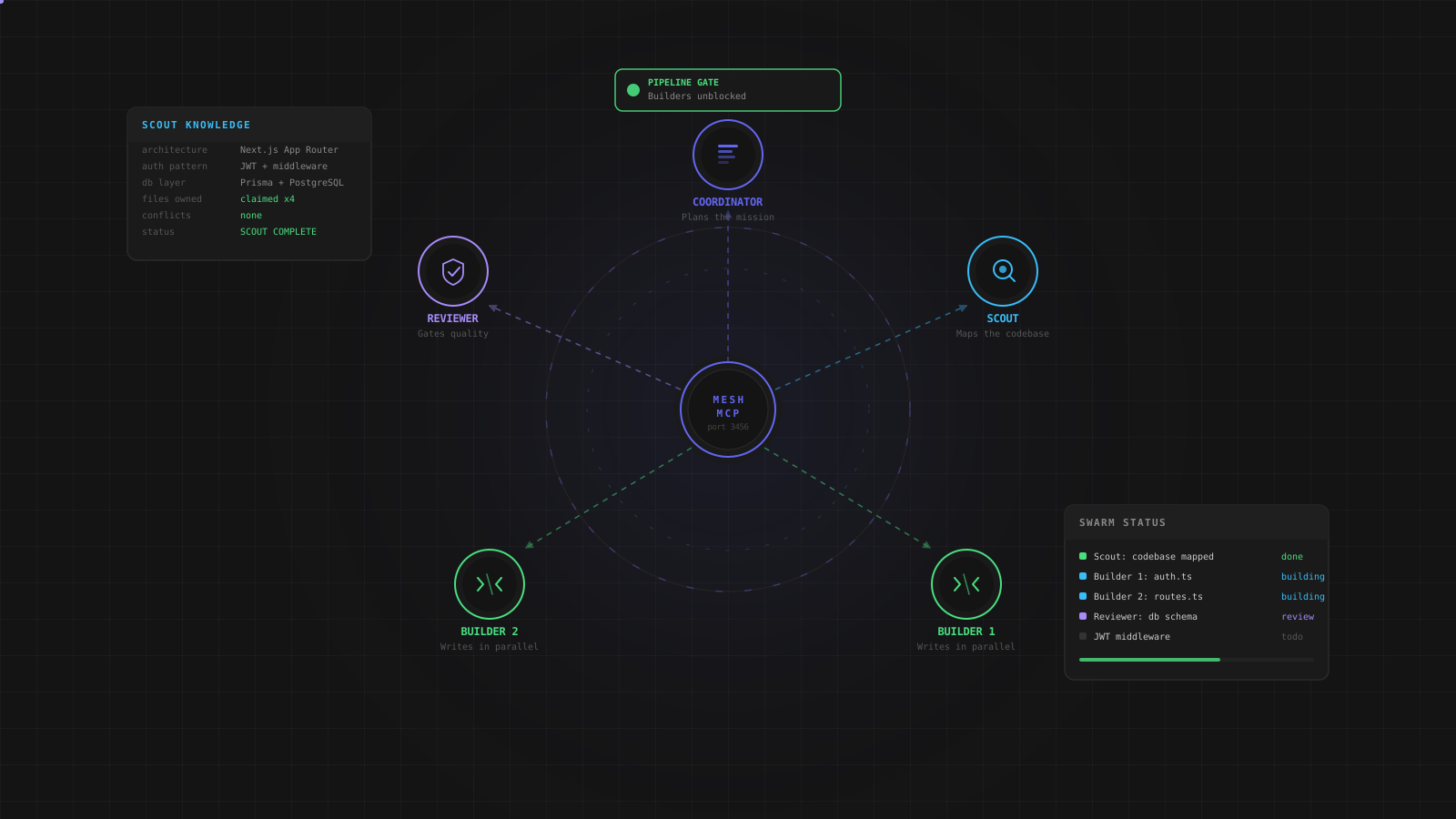
Four roles. One mission.
Every swarm is made up of four specialised agent types. Each has a defined responsibility, a defined scope, and a defined handoff point. No agent steps on another.
Plans the mission
Reads your mission statement, analyses the project, and breaks the work into discrete tasks. Assigns each task to a role with a clear description and file scope. Monitors progress and signals when the swarm is complete.
Maps the codebase
Reads every relevant source file in your project directory. Builds a structured knowledge base — architecture notes, dependency map, existing patterns, file ownership. Writes it to MeshMCP so every Builder can query it before writing a single line.
Writes the code
Multiple Builders run in parallel, each owning a different set of files. They read the Scout knowledge base, claim their files to prevent conflicts, write the implementation, and advance their tasks through the board when done.
Gates quality
Polls for tasks in review. Reads the changed files, verifies correctness, and either approves — moving the task to Done — or rejects with a specific reason that sends the Builder back to fix the issue.
Every agent reads from the same memory
MeshSwarm does not pass context between agents by copy-pasting prompts. Every agent reads from and writes to MeshMCP — the shared coordination server — so the entire swarm operates on the same live state.
When the Scout finishes mapping your codebase, that knowledge is immediately available to every Builder. When a Builder completes a task, the Reviewer sees it instantly. When the Coordinator creates a task, it appears on your Kanban board in real time. Nothing is siloed. Nothing is duplicated.
Skills — drag and drop into any terminal
Skills are reusable instruction sets that shape how an agent approaches a task. Drag any skill card directly onto a terminal pane to inject it into the agent running there. MeshSpace ships with six built-in skills and lets you create your own.
Threat-model and harden features before they ship. Covers authentication, secrets, trust boundaries, unsafe file access, dependency risk, and exploit paths. Runs an OWASP-style audit checklist on every task it touches.
Turn product pages and content into discoverable, search-ready surfaces. Reviews title, meta, H1–H3 hierarchy, Core Web Vitals risk, structured data, and AI-search readiness. Preserves your design system while improving semantic structure.
Structure changes into clean commits, safe pushes, and reviewable PRs. Groups related changes, writes conventional commit messages, excludes build artifacts and secrets, and produces a review-ready summary with migration notes.
Use MCP-backed project context intelligently. Keeps task lifecycles disciplined, avoids skipping required transitions, pulls relevant artifacts and prior decisions before making changes, and records important state changes where the rest of the swarm can consume them.
Prepare releases with production readiness checks. Verifies build assumptions, environment variables, migrations, backwards compatibility, monitoring, and rollback options. Produces a clear deploy sequence with post-deploy verification steps.
Apply MeshPilot's dark visual language with disciplined spacing, restrained contrast, and compact chrome. Matches existing surfaces, borders, and contrast levels. Keeps forms, cards, and toolbars consistent with surrounding UI.
Create your own skills
Write a skill once — give it a name, a description, a command shortcut, and a full markdown instruction set. It appears in the Skills panel alongside the built-in ones. Drag it onto any terminal to inject it into the agent running there. Your skills persist across sessions and workspaces.
Everything the swarm needs, built in
MeshSwarm runs inside MeshSpace, which means every agent has access to a full set of tools without leaving the app.
Built-in browser
A full browser pane inside MeshSpace. Agents can launch your project's dev server and preview it without switching windows. Supports local dev servers, HTML files, and any URL.
Parallel terminals
Each agent runs in its own persistent terminal pane. Sessions survive workspace navigation. Multiple swarms can run simultaneously in separate workspaces.
Live Kanban board
Task cards move columns in real time as agents work. Click any card to see the full activity log, status history, assigned agent, and files owned. No refresh needed.
Notification system
Terminals and sidebar items glow with a heartbeat effect when active. An audio chime fires on completion. Desktop notifications route your attention to the right workspace even when you are elsewhere.
MeshVoice integration
Use MeshVoice to dictate instructions directly into any terminal pane. Speak a correction, a new task, or a clarification — it appears at the cursor in the agent's terminal instantly.
Agent network graph
A visual graph showing all active agents, their roles, and the connections between them. Role colors are consistent across every surface — roster, board, terminals, and graph.